AI Can Write the Code. You Still Have to Engineer the System.
Before anybody gets splashed going through a wave, a surprising amount of work has to happen.
I’m Justin Smith, General Manager at Adventure Idaho. I’m preparing to speak at the Idaho Outfitters and Guides Association conference about that work: what I built to help run it, what took longer than I expected, and what another operator can use even if their business looks very different from ours.
At peak, our crew of 44 worked across multiple locations in Idaho.
These are the ideas I’m bringing to the talk. The dispatch case study shows the tools. This is about the decisions behind them.
The levels of integrating AI into a business
Before the rafting story, here’s the map I use. There’s a difference between asking AI a question and building it into the way a business runs.
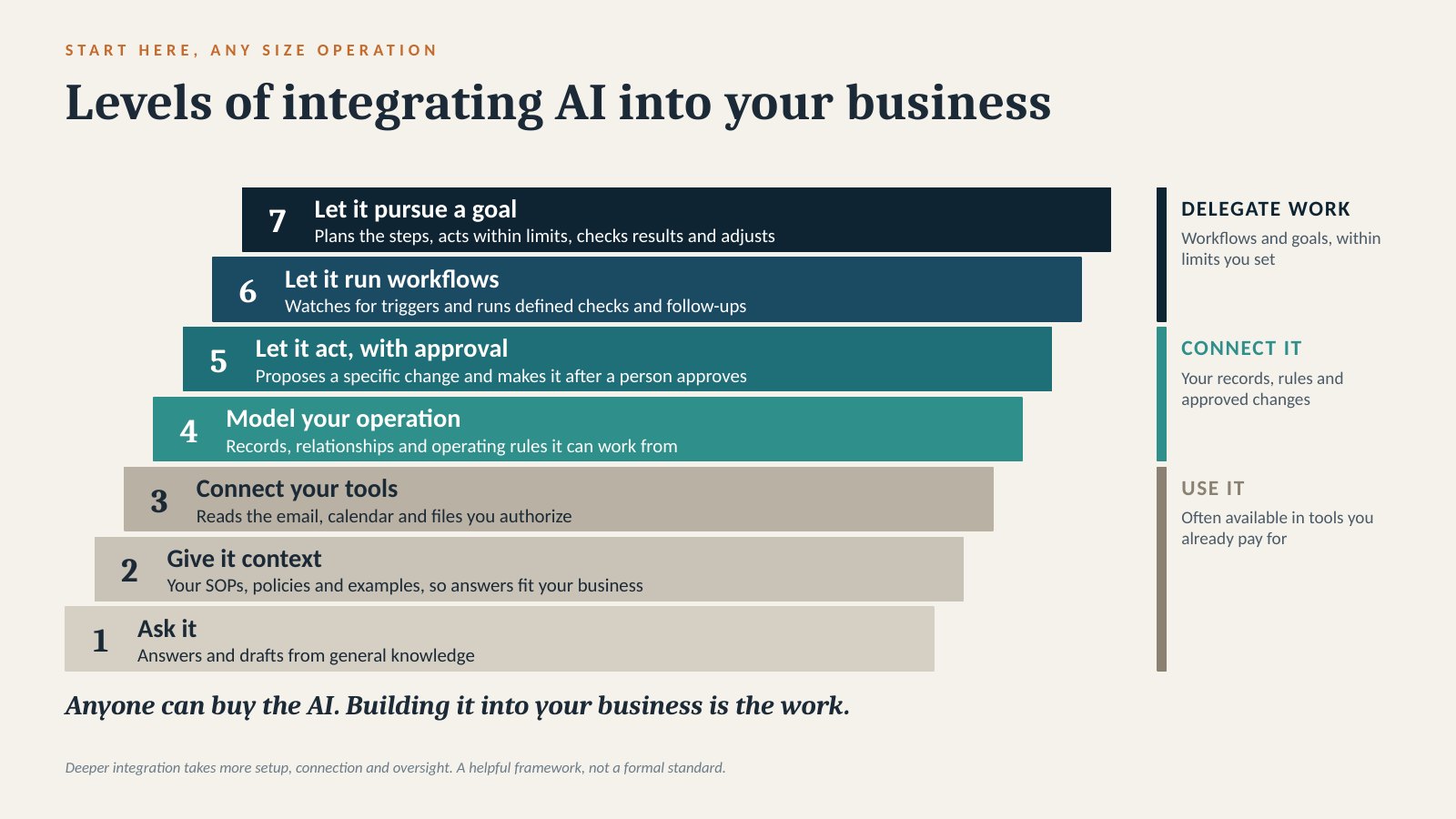
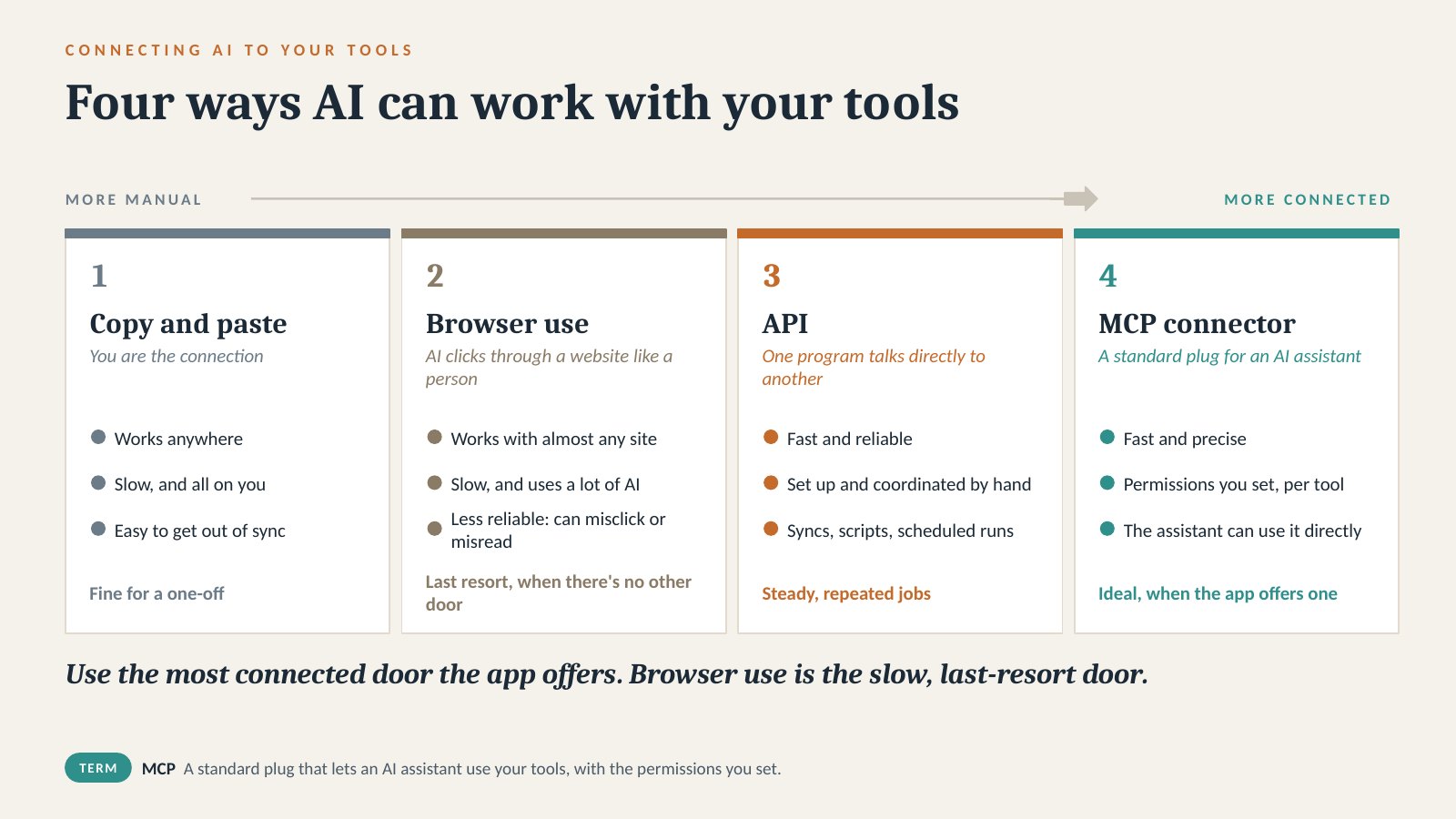
At the bottom, I bring the assistant a question. Then I give it useful context: our procedures, policies and examples. That means supplying information, not retraining a model. Connecting it to authorized tools lets it look up information instead of asking me to paste it in.
The fourth level is modeling the operation: linked records, relationships and operating rules an assistant can work from. The next three levels give it different responsibilities:
- 5. Let it act, with approval. It proposes a specific change and makes it after a person approves. That requires a supported way to write the change and the right permissions.
- 6. Let it run workflows. It watches for a trigger and follows defined checks and follow-ups. Many routine checks can run as ordinary software, with AI where interpretation helps.
- 7. Let it pursue a goal. It works out the steps toward a bounded goal, checks the results and adjusts within the limits I’ve set. It stops for required approvals.
People still set the goals, permissions, approval points and stop conditions. Logs and oversight matter more as the system takes on more responsibility. These are useful distinctions, not a formal standard or a sequence every business has to follow. A proposed plan is not an executed change or a guarantee of the best possible answer.
This isn’t a requirement to write all your own software. Buying, configuring, integrating and custom-building are all options. I choose based on the job, access to the data, permissions, reliability, cost and who will maintain it. More integration is useful only when it solves a real problem.
My experience at Adventure Idaho has been working through those decisions: what the system needs to know, which rules belong in code, where AI helps, and what still needs a person. The whiteboard story is where that became concrete.
A reservation is the beginning of the plan
A group wants to move its trip to tomorrow. Another group grows enough that the vans no longer work. Now we need a bus, which means checking for an available CDL driver. A multi-day crew gets back that afternoon, but those guides need time to unload, clean and rig before their next assignment. Rentals draw on some of the same equipment.
Each decision changes another decision. A name in a guide field doesn’t tell me whether that guide is available, qualified, rested, already promised somewhere else or able to reach the next assignment on time.
Booking software is crucial. Taking reservations and payments well is a substantial job. Broadly useful software also has to serve many kinds of businesses. Trying to fit a particular operation into its scheduling fields can feel like pushing a round peg into a square hole.
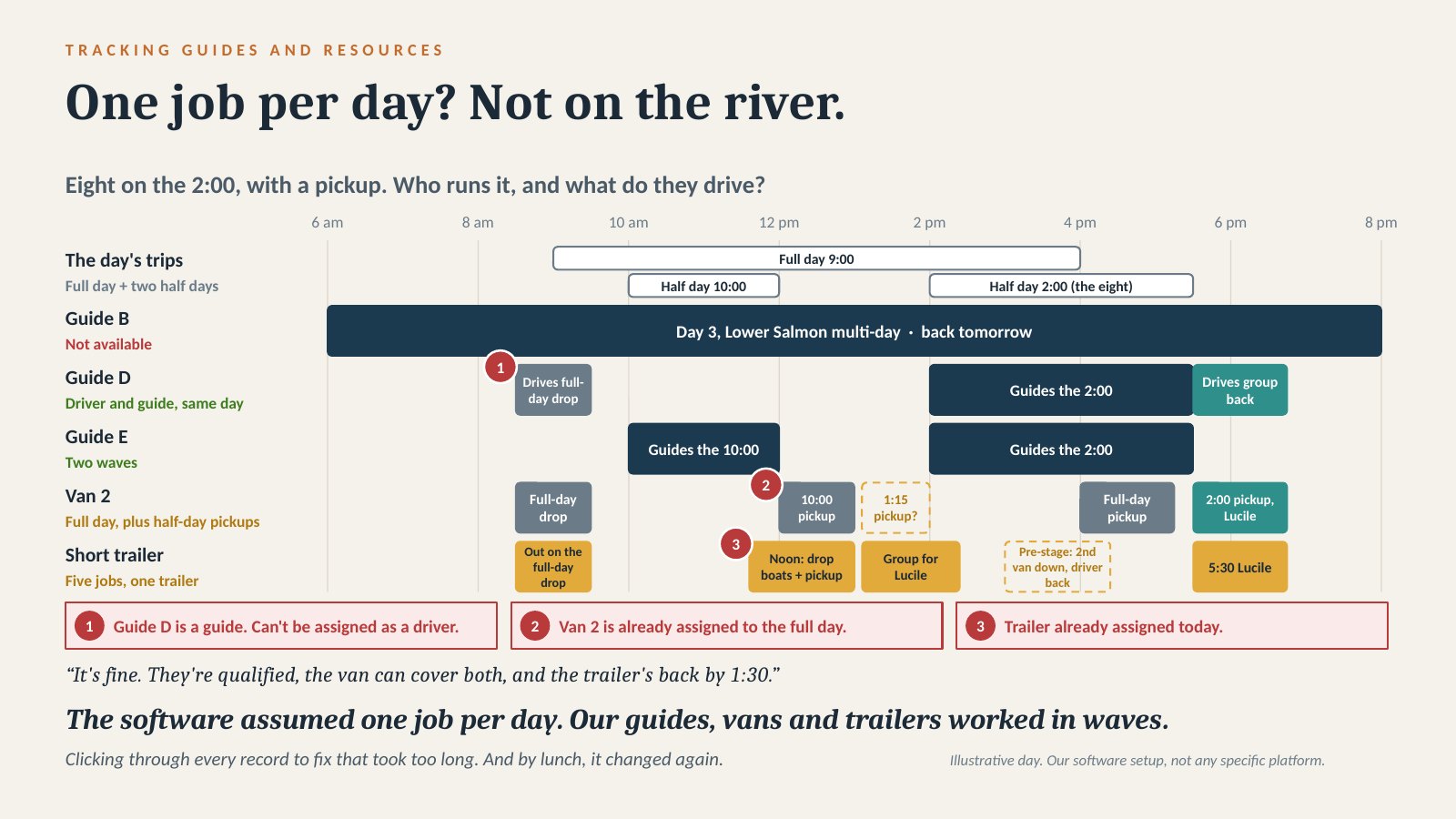
Our software setup also assumed one job per day. On the river, a guide can drive a morning shuttle and then guide an afternoon trip, if they’re qualified and the timing works. One van can drop off a full-day group, pick up a half-day group and bring another group back from the take-out. When I stacked those jobs, the software flagged them: this guide can’t drive, this van is already assigned, this trailer is already in use. I had to check the qualifications and timing, then work through the errors and update the records by hand while the day kept changing.
Our whiteboard worked because it was fast. I could erase something, move a name and see the whole day. The problem was how much knowledge had to stay beside it.
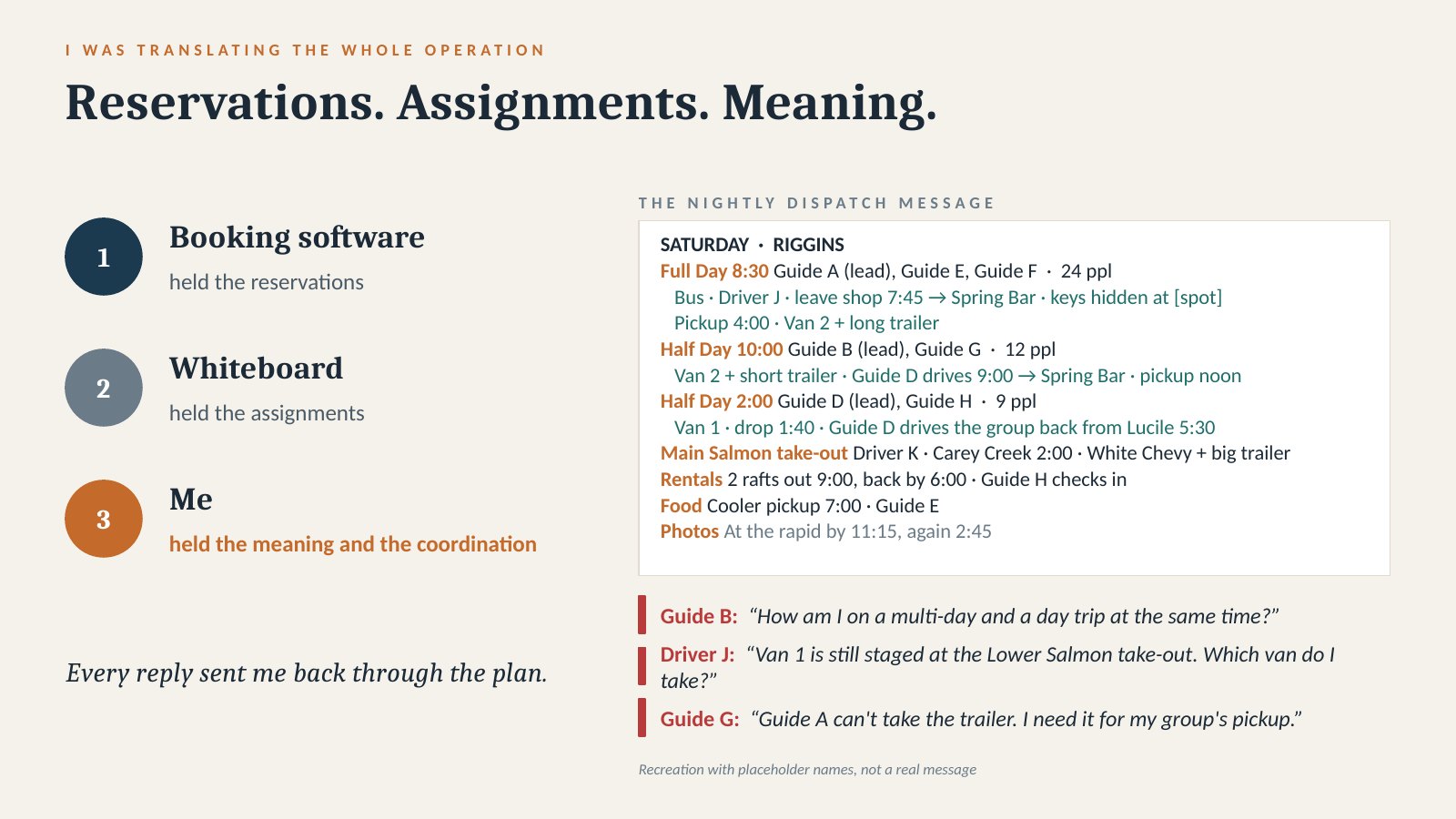
The booking software held the reservations. The whiteboard held the assignments. I held the connections between them.
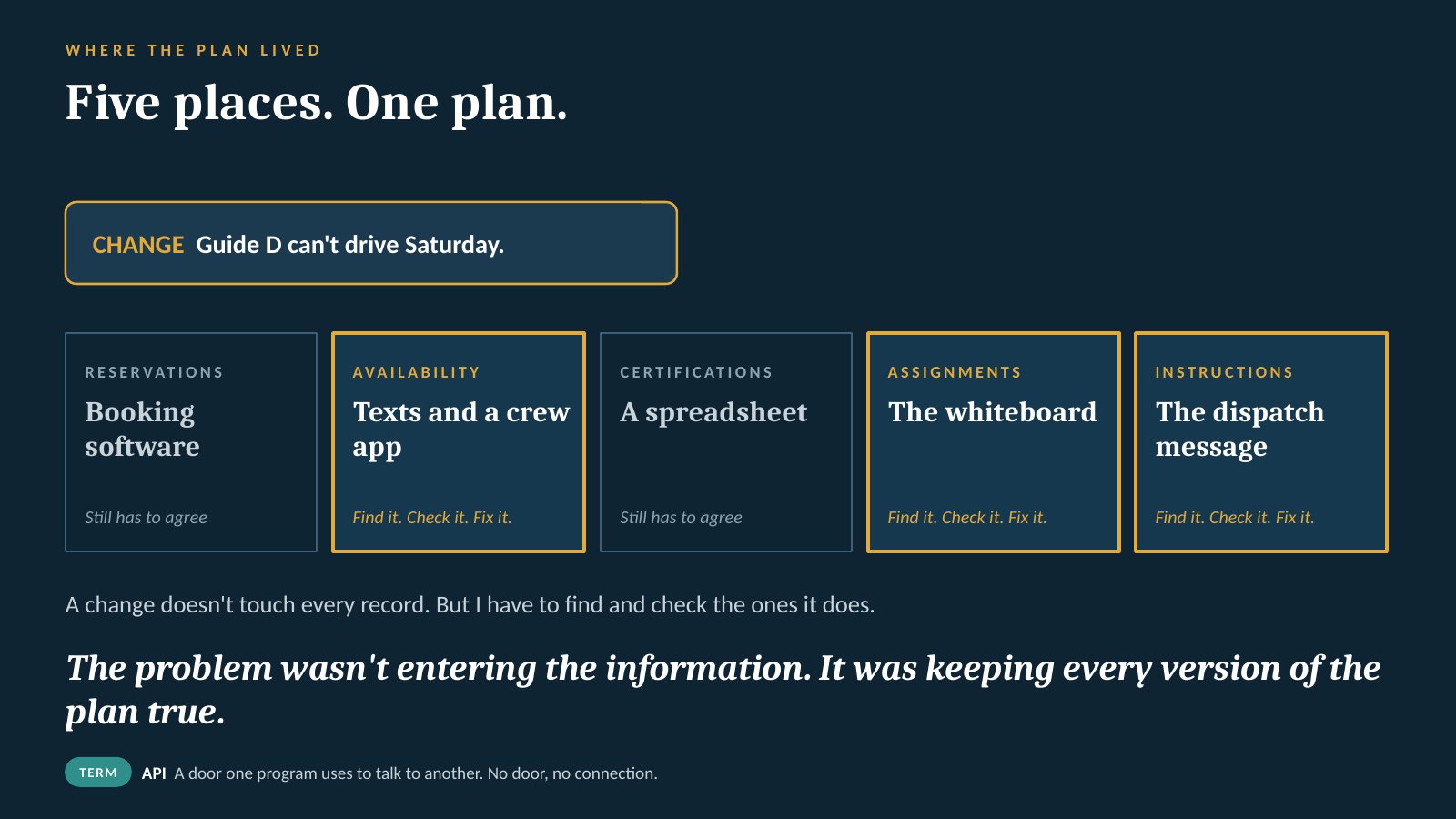
Then I had to translate the board into dispatch messages: which group, what time, which vehicle, which trailer, where to go next. Updating the plan meant updating the explanation too. A guide looking at the board and a guide reading yesterday’s message could be looking at different plans.
The part AI could not guess
I was already using AI. But it couldn’t coordinate an operation whose reservations, availability, qualifications, assignments and instructions lived in separate places.
During the summer of 2025, I tried giving ChatGPT a photograph of the whiteboard and asking it to help untangle the schedule. One suggestion was to take guides partway through a Main Salmon trip, have them cover a day trip, then finish their multi-day trip.
It could read names. It didn’t understand what those assignments meant in the real world.
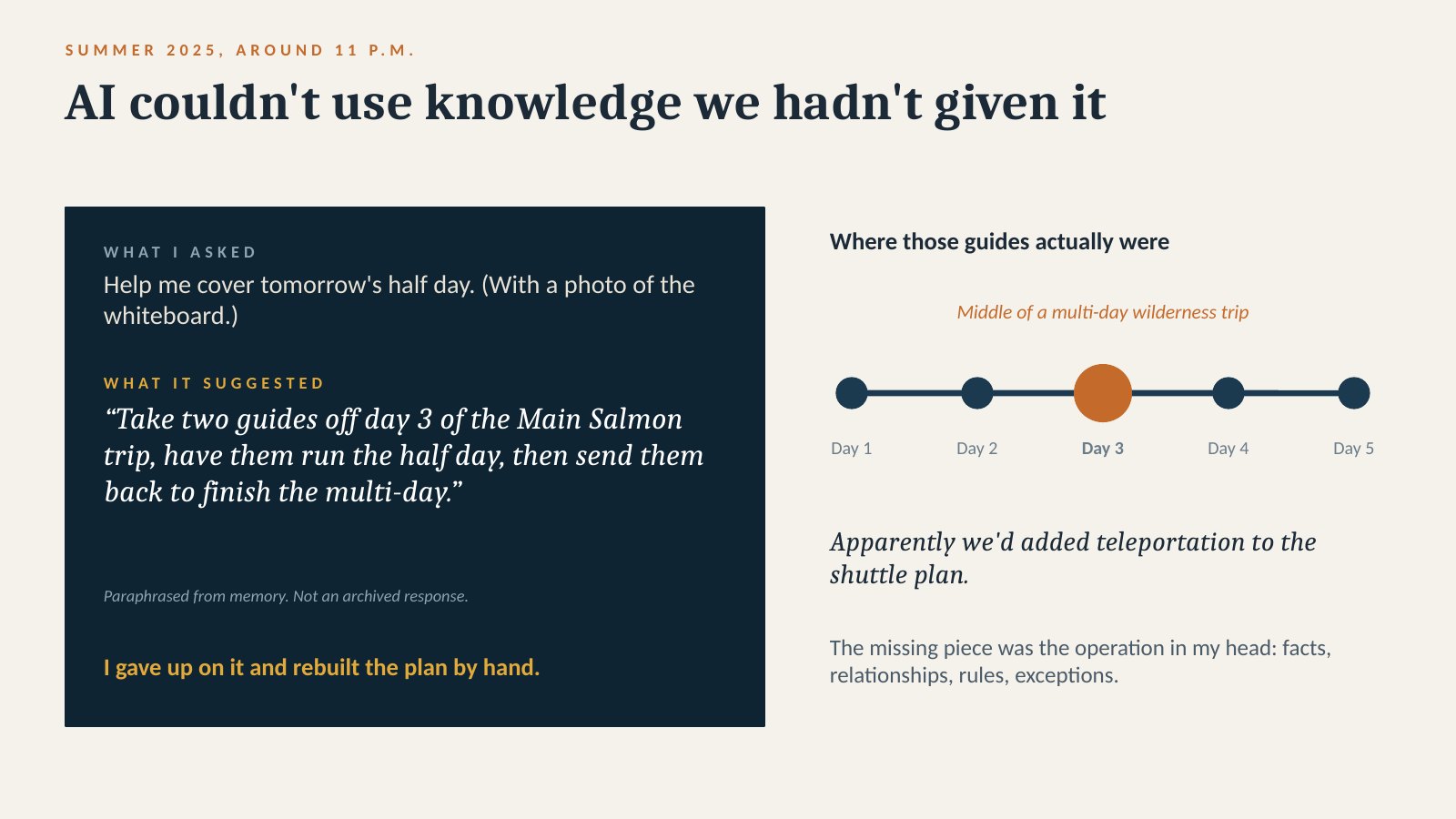
That experience is still useful to me. A convincing answer can be impossible. The missing work was to make the operation understandable: the people, equipment, trips, locations, timing and rules connecting them. I’ve written more about that first attempt and getting off the whiteboard.
I started building the connected records and tools around those relationships. That became what I call the company brain: our operating records, the relationships between them and the rules for using them.
The booking software still owns the reservation and payment records. The company brain connects a reservation to the people, equipment, timing and rules needed to deliver the trip. Email, calendar and payroll still do their own jobs. Not every tool runs on our database; the useful parts connect to it.
That gave me a foundation I could build different ways of working around: the crew board, a phone view or a spoken request. The operating knowledge doesn’t have to live only in the screen I happen to be using.
A return time and a ready-to-work time aren’t the same fact. A guide may be back at the shop but still need to unload and rig. A vehicle can handle several movements in a day if the times and places line up. I had to represent those relationships, including the exceptions and the time window each rule applies to.
That is where my operating experience mattered. I knew which questions to ask because I had been the person answering them. For each connection, I had to work through:
- Which system owns this fact, and which other tools need a copy?
- What business rules apply when it changes?
- Who can read it, propose a change or approve the update?
- If the sync stops or two records disagree, how will we notice and who will resolve it?
I also decided where the operating system stops. Payments stay in the booking software. Sensitive payroll details and bank information stay with the payroll company. Deleting records and changing access stay with a person.
A connector can move information. Those decisions determine whether the information is useful and trustworthy in the operation. AI helped write the software around them.
AI can write the code. You still have to engineer the system.
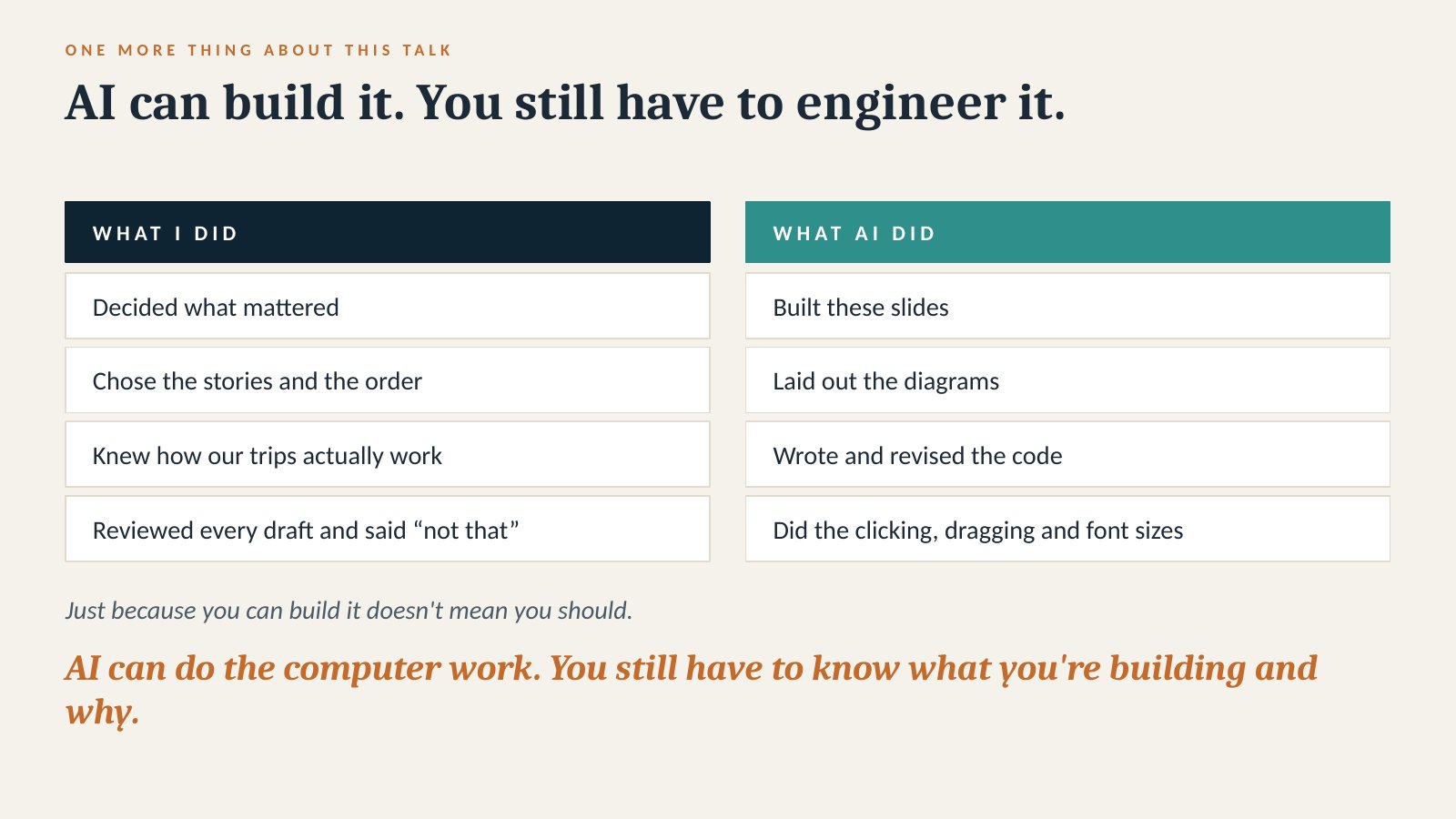
In 2026, I took down the whiteboard. We didn’t use it all season. The change was possible because the records, rules and connections behind the board were finally in place.
One board is only the visible part
The crew board is the easiest thing to show. Behind it are guide availability and qualifications, assignments, vehicles, trailers, equipment, food planning, issue tracking and reporting.
The board is one window into the company brain. The same records support:
- Changes by voice and conflict checks. A proposed change can be checked against the board before I approve it. The conflict engine also checks changes as they happen.
- A booking feed and guest details. The feed reconciles reservations, and guest details stay attached to the right trip.
- Shared field texts and a morning digest. A field text reaches every manager at once. The digest brings missed calls, texts and inquiries together for review.
- Credentials and food planning. Expiring qualifications are flagged, and menus, cooler sheets and shopping lists scale to the trip.
- Photographer timing. Reminders help the photographer get downriver and into position before the boats arrive.
Replacing the whiteboard came fast once the base existed. The base was the hard part. More of what it runs.
I didn’t replace the booking system with a board. I kept the specialist tools and built the operating relationships around them. Once that base was in place, another view or workflow could use the same records rather than start with another disconnected copy of the plan. That’s how I designed ours, not a requirement for every business to build a custom database.
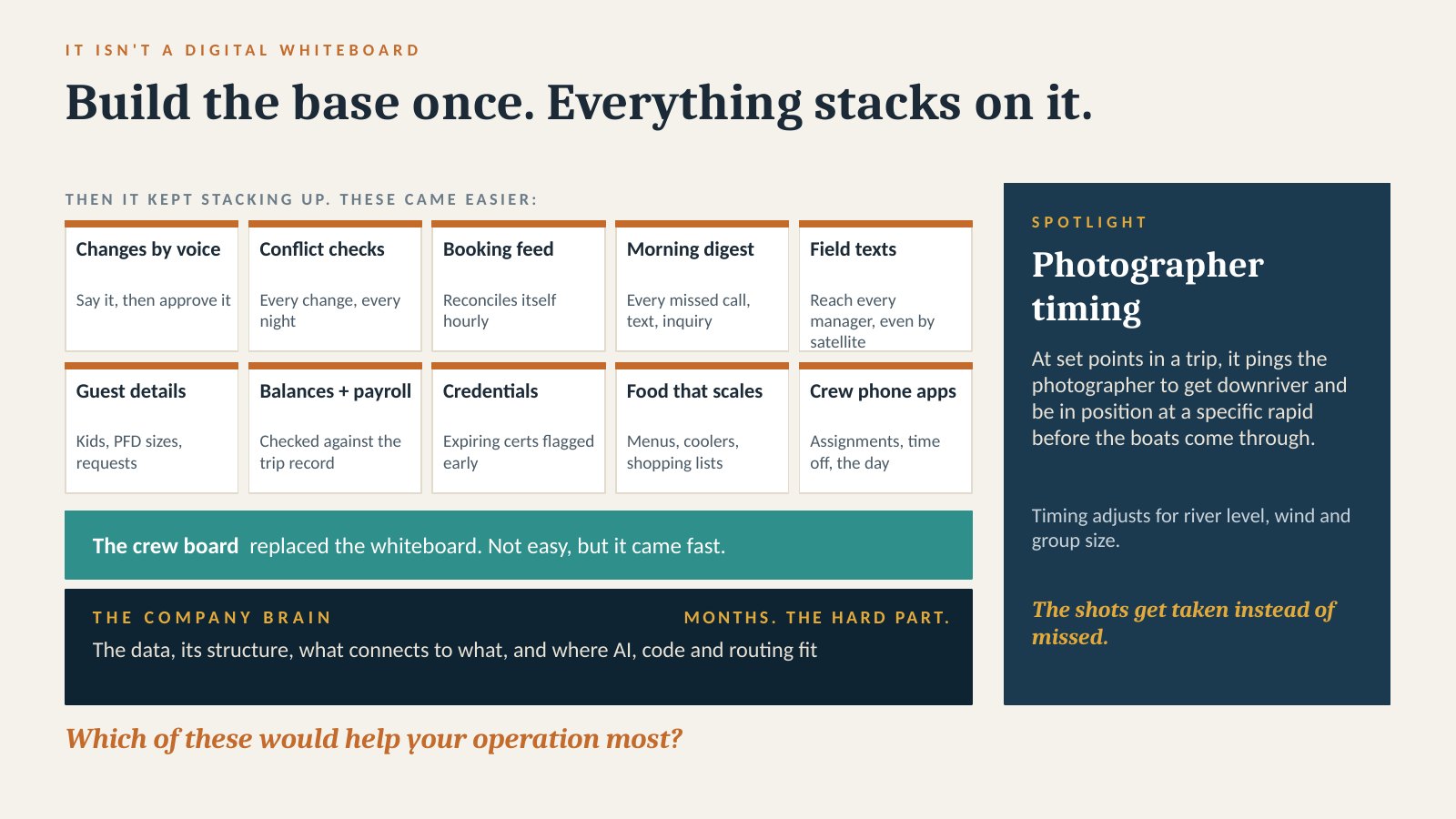
The crew can see assignments and trip details on their phones. The office can check conflicts against connected records rather than reconstruct the whole operation from memory. The same information supports food preparation, maintenance tracking and payroll preparation. Permit and usage reports are another reason to keep the underlying trip records useful.
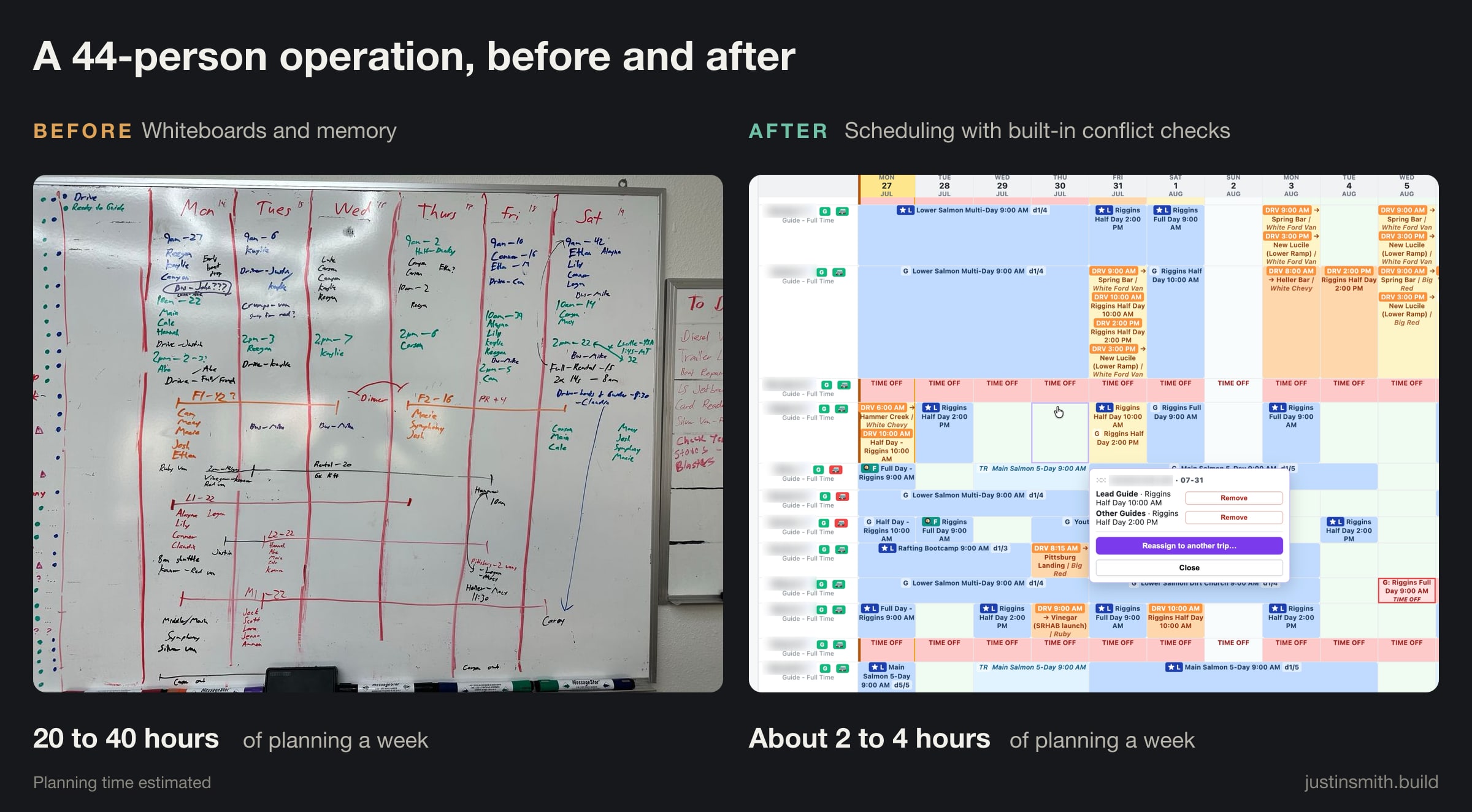
My estimate is that weekly planning dropped from roughly 20–40 hours to 2–4. That’s an estimate of planning work, not my entire job or an audited productivity study. It gave me more room for guide training, driving, photography and improving other parts of the operation.
The useful result was breathing room to manage the business better.
Voice gets interesting when something is connected
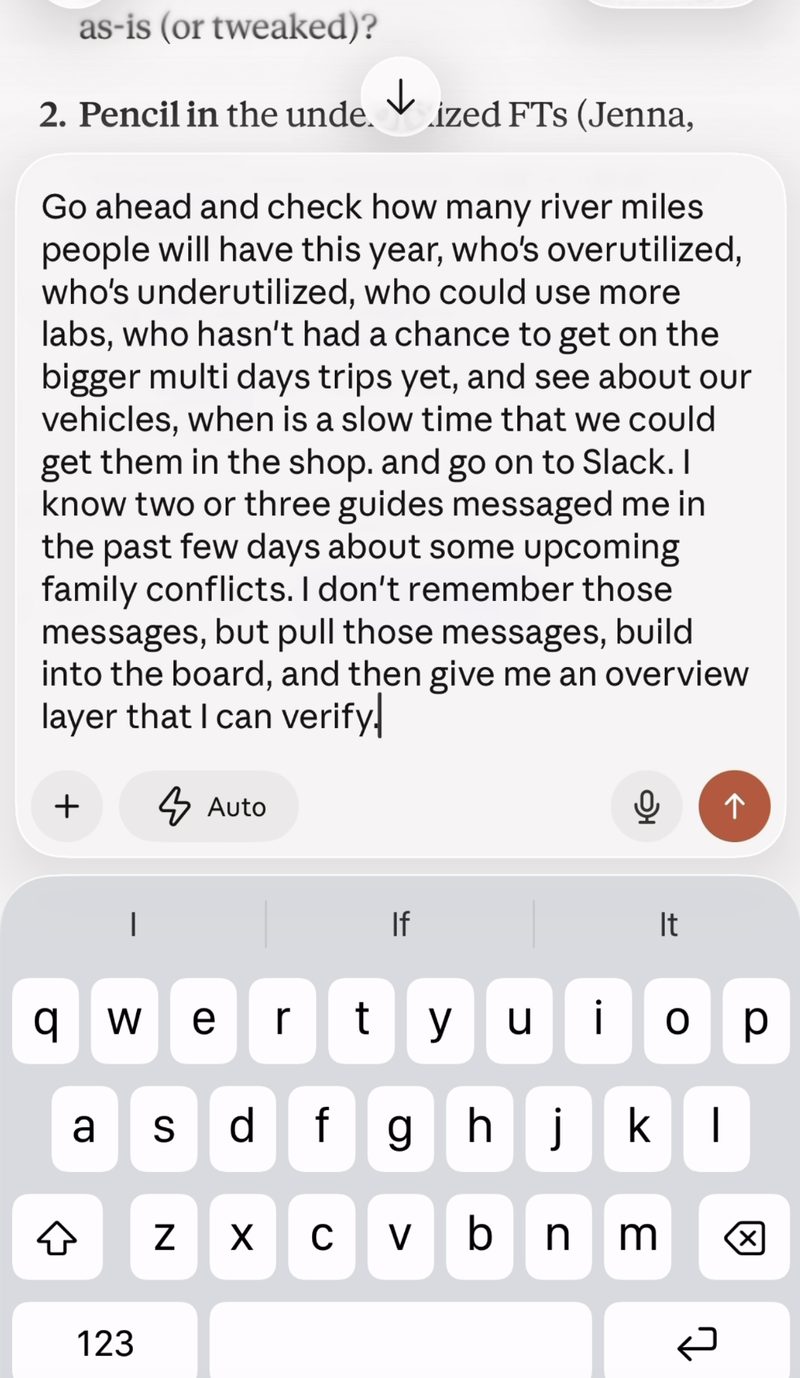
Dictation alone saves typing. A connected assistant can work with the records and tools behind the words, within the access it has been given.
I can describe a change, ask what it affects and review a proposed response. That is a very different workflow from opening several apps, finding the same information in each and typing it again. My spoken production-fix example shows one way I use that speed.
One guide’s message said they’d take another guide’s driving the next day: the full-day drop-off, the pickup and the 3 o’clock half-day pickup. The system matched that message to three driving movements, checked them against the board and staged the change. I reviewed and approved it before the schedule updated in the crew’s apps. The first time I saw it was about two hours later. Before, a message like that could mean 30 minutes to an hour of checking the board, texting people and waiting for replies. The useful part was understanding what “that driving” referred to in our operation. It wasn’t just transcribing a sentence.
Buying an AI subscription for everyone doesn’t create this workflow by itself. The useful work is deciding what connects, who can change it, what needs approval and how the team knows a change actually happened.
That’s why the levels at the beginning matter. Connecting an app is one step. Making its information usable in a decision, and giving a person a clear way to check the result, is the integration work.
Speed needs checks
A database can be wrong. A sync can stop. An assistant can misunderstand. A person can miss an assignment that was correctly recorded.
I want the system to make those problems visible. Hard conflicts block an assignment that breaks a rule. Soft conflicts flag something that needs judgment or confirmation. An override needs an explanation. A change log tells us what happened. Important changes need a person to review them, and important assignments need acknowledgment from the person doing the work.
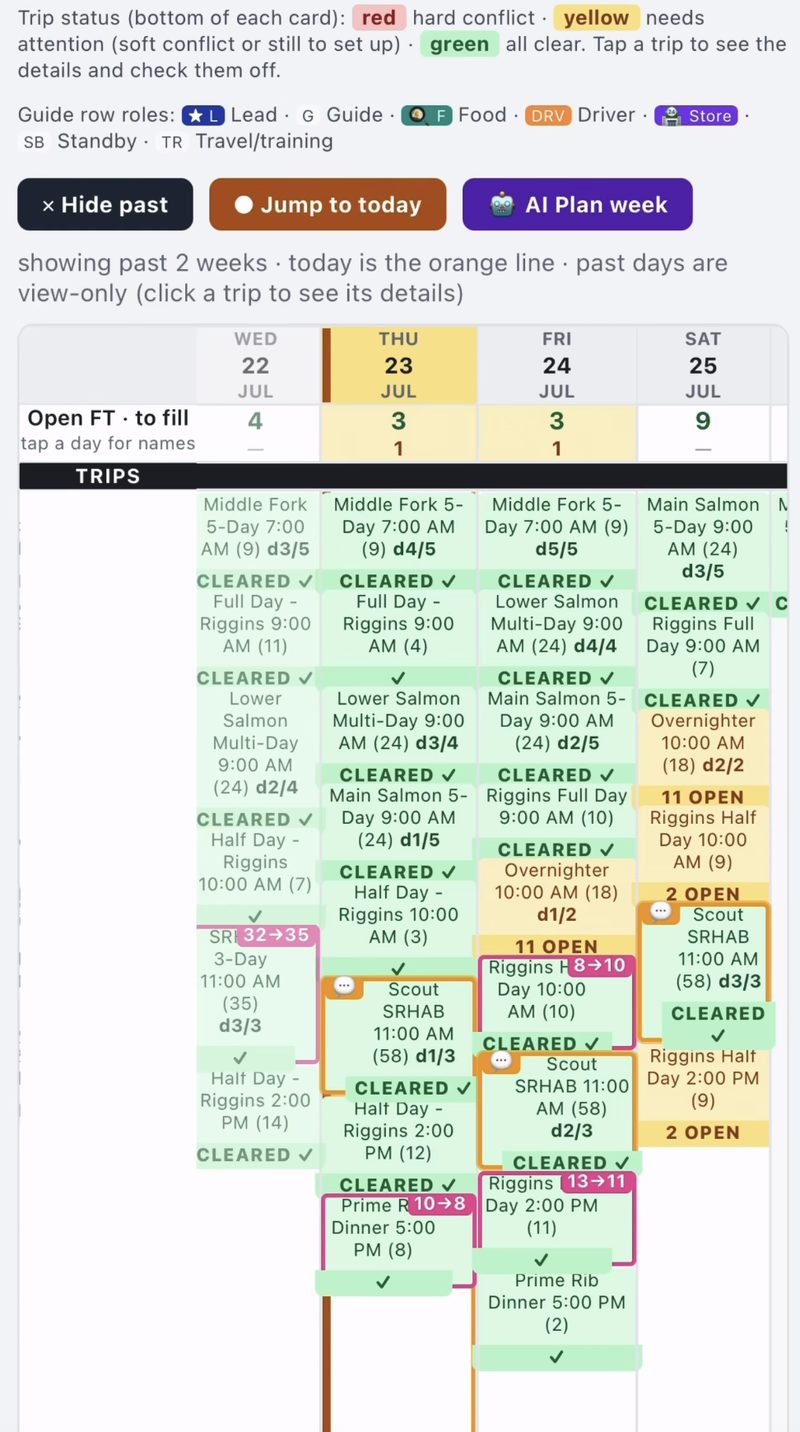
The crew board also has an “AI Plan week” control. In the workflow I describe in the talk, it proposes crew for the week’s trips. I review and adjust the draft, and nothing is written until I click Apply. In the version I reviewed, the proposals come from coded rules, not an AI model. It is a reviewed planning step, not a full goal-directed system running on its own or a guarantee of the best possible plan.
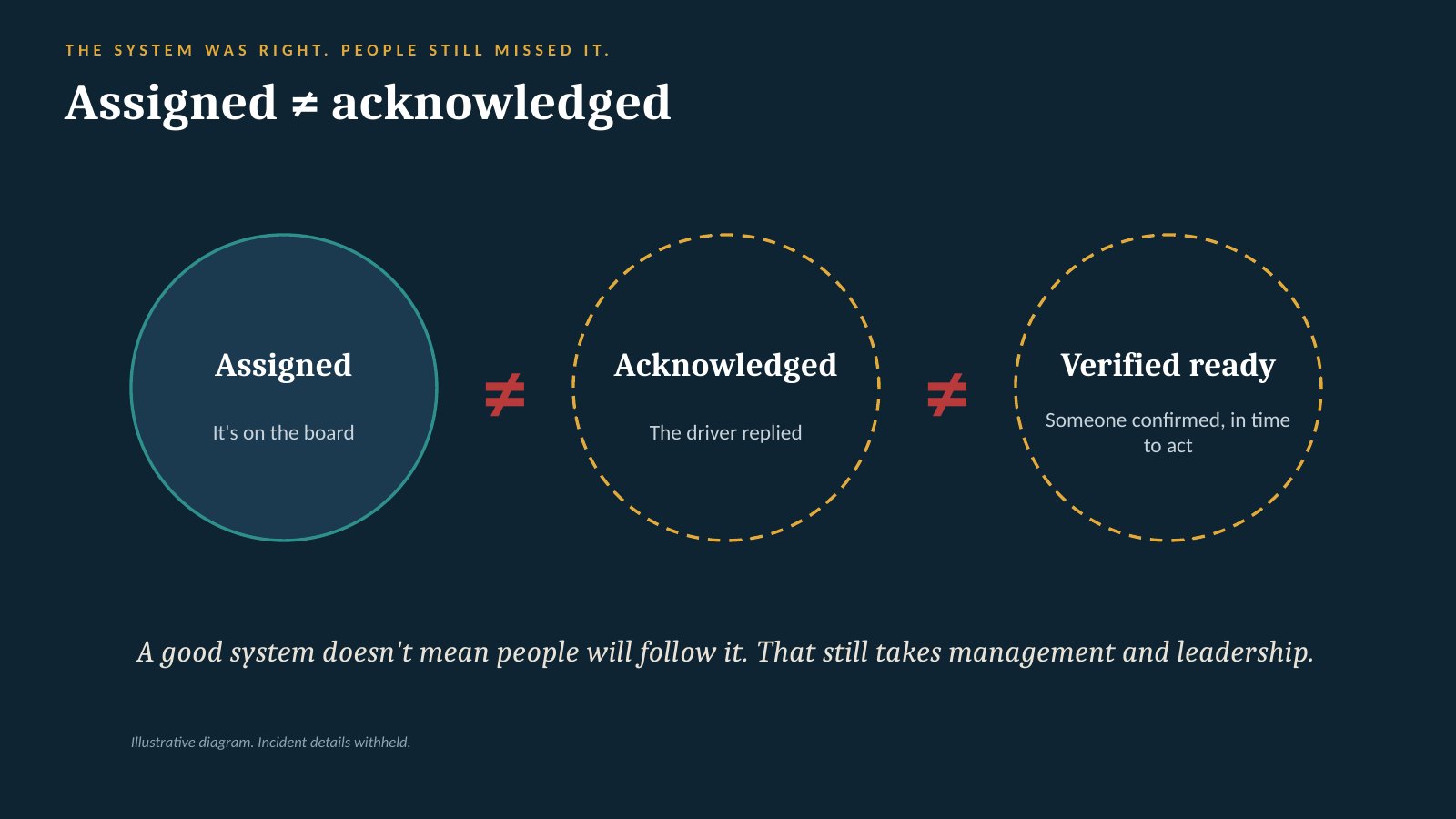
A good system still needs management and leadership.
Before giving an assistant another permission, I ask what could happen if it gets the task wrong. Reading a schedule, proposing a change and changing a customer’s booking are different levels of responsibility. External booking records remain read-only in the operating system described here; that is different from letting an agent change reservations or payments.
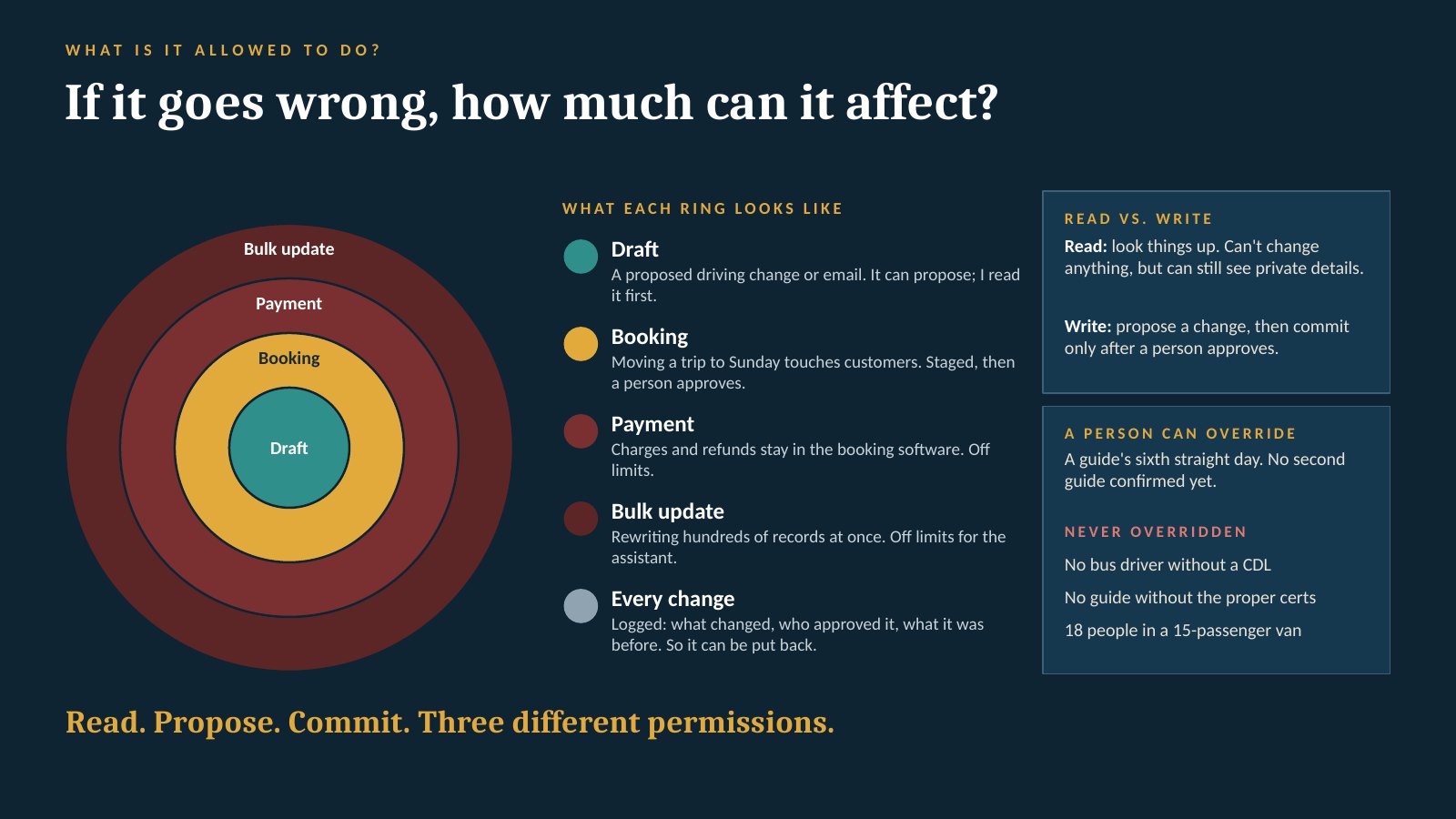
The benefit of tracking an issue is also practical. Someone reports it, someone owns the next step, and someone verifies the work is complete. A longer task list on its own doesn’t make an operation safer.
Some things should stay simple
I could try to model propane use from trip length, group size, stove type and weather. I could build a dashboard to track every paddle.
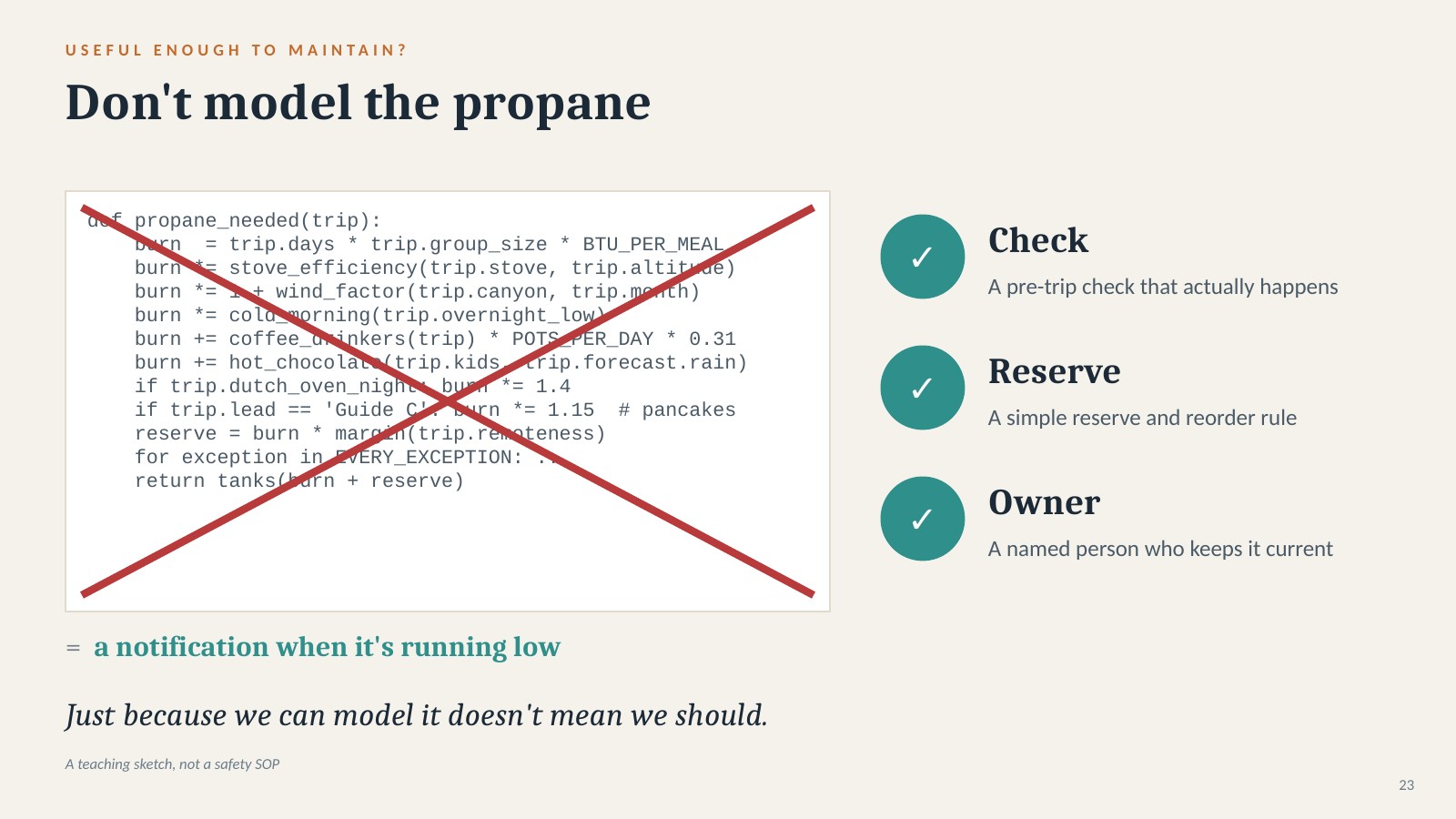
But the model is only useful if the inputs stay reliable and the result changes a decision. A straightforward equipment check, spare supply and clear restocking responsibility may solve the propane problem better. A paddle count that nobody can maintain is another thing to fix.
Build the system people can keep accurate.
The same judgment applies to AI itself. Building the tool and running it are different jobs:
- AI helped build the tool. I used it to write, test and revise the software.
- Software checks known rules. Fixed calculations, such as comparing a headcount with a van’s recorded capacity, belong in code. Routine transfers between tools can often run through ordinary automation.
- AI helps interpret messy requests. It can help work out what someone means, investigate and propose options. Changes by voice use a model to interpret the request before I review a proposed change.
- People decide. I decide what is worth building and review consequential changes.
I don’t need a fresh model call to do arithmetic every time the headcount changes. A model call is a request to an AI model for a response; it isn’t every piece of software running behind the board.
The graphic below compares ten selected jobs from our system. As far as I’ve confirmed, nine run as code; voice changes use a model call. That is a count of examples, not a percentage of the system’s AI use. Other activities, including questions across Google and Slack, also use models. The curves illustrate a design choice, not measured requests, cost or environmental savings.
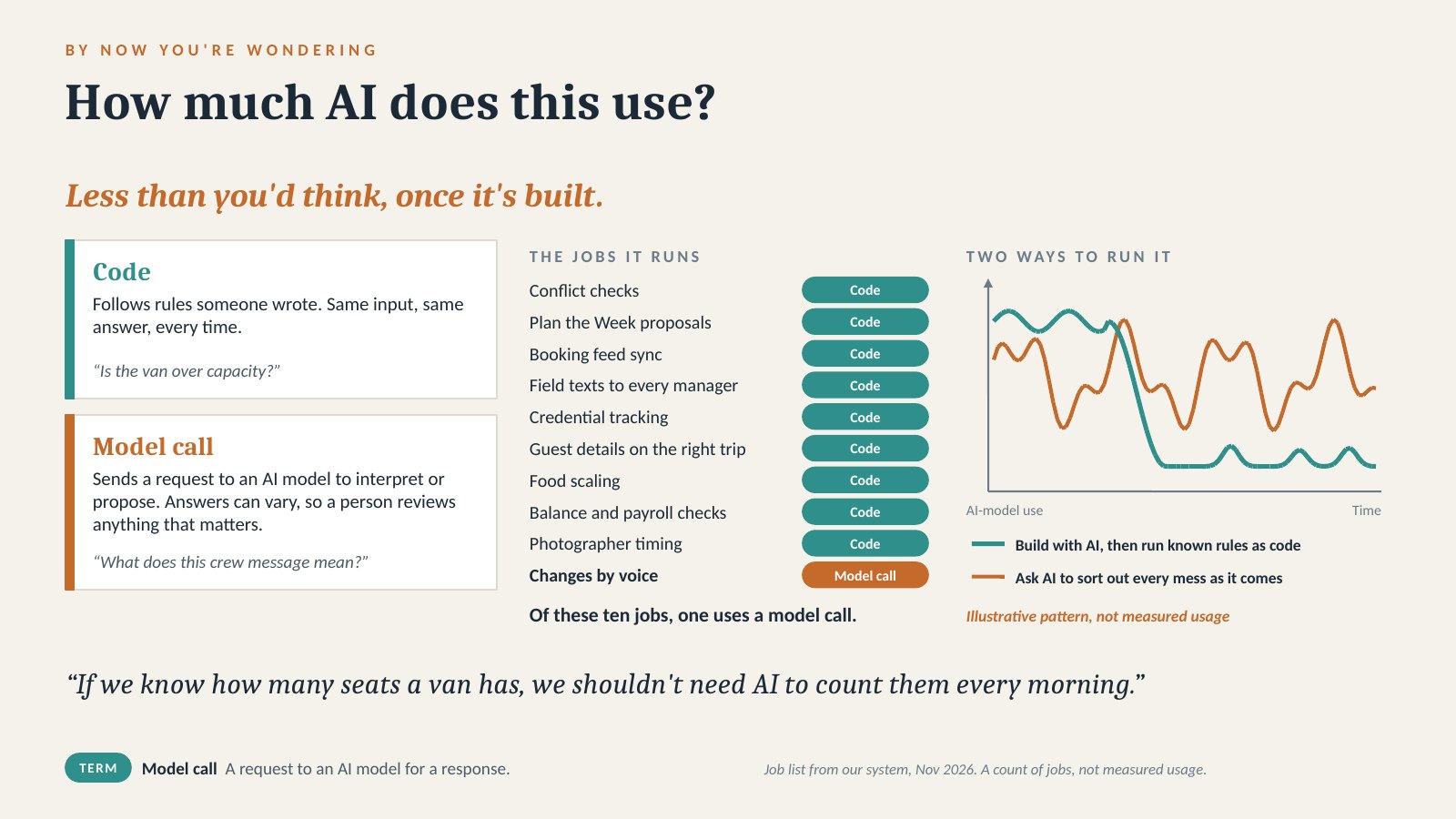
That is the distinction behind using AI to build the system. It still takes maintenance, hosting, testing and attention. It also has environmental costs. I don’t have a defensible water-use figure for this project, and I won’t turn it into a shower comparison. I want useful tools that reduce repeated work, not more processing for its own sake.
Adoption is another engineering decision. If checking the board on a phone is harder than asking someone, people will keep asking. I want the useful information close to the work, and a clear person responsible when something is missing or wrong. A system people don’t keep current won’t stay useful, however much code we can generate.
When evaluating software, I also want to know whether I can access the underlying records, receive change notifications and use supported write actions where appropriate. My Exhibit Hall Test is a starting point for those conversations. Access still needs permissions, checks and someone responsible for maintaining it. These questions help me keep options open and connect useful tools around the booking system we already value. They aren’t an argument for replacing it.
What I think comes next
I expect more business work to start with a conversation instead of a sequence of clicks. That’s a prediction, not a timetable. It won’t remove the need for good records or for people who understand the operation. In my experience it makes that knowledge more valuable.
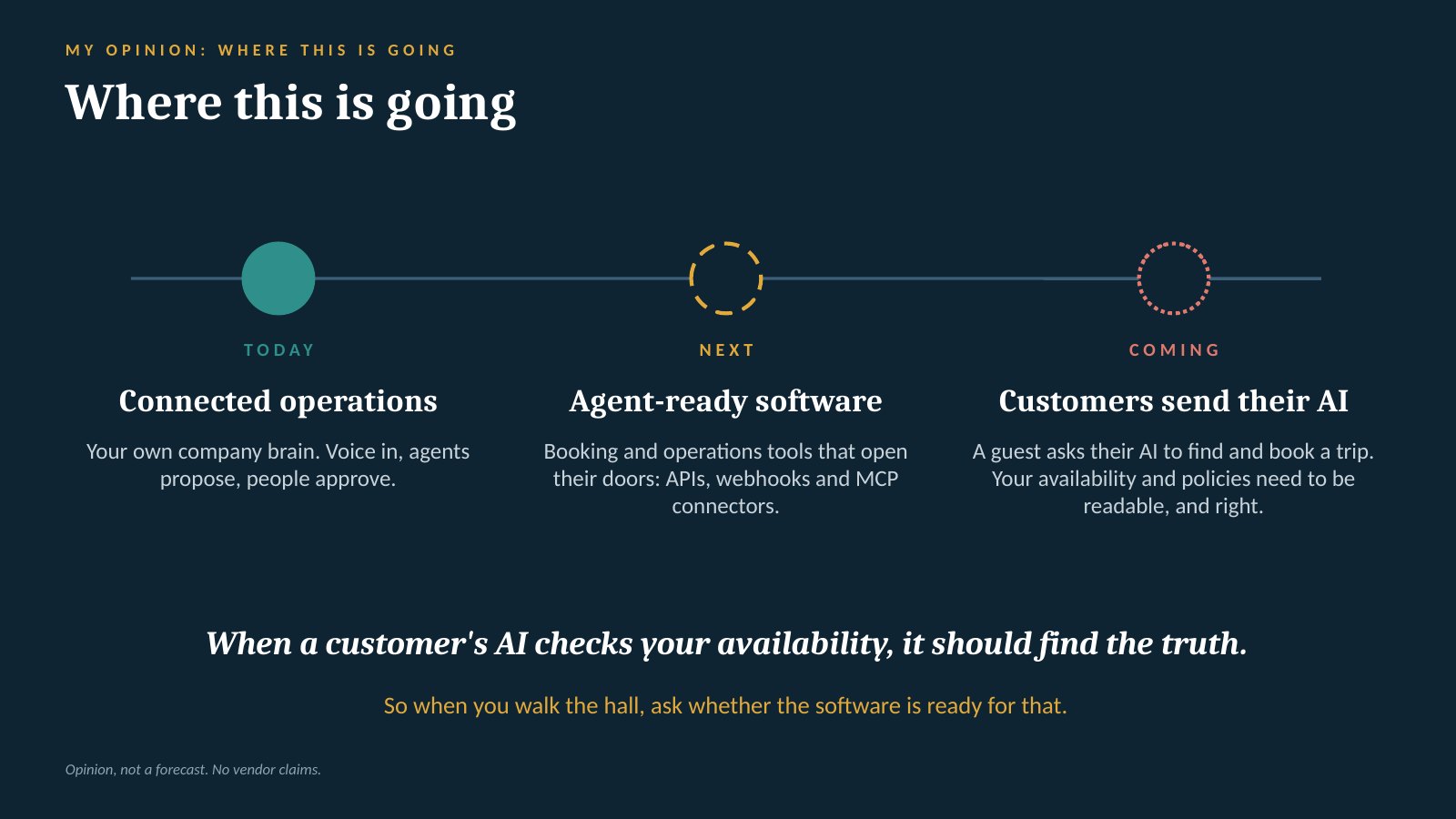
For a high-trust business, I still want a capable person talking with customers. I’m more interested in taking repetitive coordination off that person’s plate than putting a robot between them and a guest.
I love Idaho’s rivers and the people who work on them. Better preparation, fewer avoidable trips back for something forgotten, clearer responsibilities and more time for training are worth working toward. That’s why I want to share what I’ve learned with other outfitters.
If you’re coming to IOGA, I’d enjoy comparing notes. Bring a process that keeps pulling you away from the work you actually want to do. We may not need to build very much to make it better. Get in touch.